Objects in JavaScript
Understanding the working of Objects in JavaScript with data
Introduction
An object is the basic building block of programs in JavaScript, used in building classes and complex data, and as an integral part of object-oriented programming. It is a real-world entity.
Types of Objects in JavaScript
There are two main types of objects: built-in objects and user-defined objects.
Built-in objects come with the language, such as Math, Date, and Array.
user-defined objects allow developers to create their own object types.
Creating Objects in JavaScript
Object Literal: This is the most common way , where you define key-value pairs enclosed with curly braces and Property and values are separated by Colon (:)
Example :
 const person = {
     name : "Alice",
     age : 30,
     greet : function(){
         console.log("Hello , my name is " + this.name);
     }
 };
Using a Constructor Function : We can define a function that acts as a blueprint for creating objects.
 function Person(name, age) {
   this.name = name;
   this.age = age;
 }
 let person1 = new Person("Alice", 25);
Here Person is a Function with name and age as arguments. This is a keyword used to refer current object.
Using Object.create( ) : There is a method called .create to create an Object
 let animal = Object.create(null);
 animal.type = "Dog";
Difference between Object Literals and Constructor Function ?
Object literals are quicker and simpler for creating single object . On other hand, Constructor function are better for creating multiple objects of the same type and managing shared properties and methods .
Properties of Object
Let’s take an example to explore all the properties of object
const person = {
    name : "Yash Roy",
    age : 30,
    fullName : {
        firstName : "Yash",
        lastName : "Roy"
    },
    company : "XYZ",
    email : "abc@gmail.com",
    attendance : 25,
    greet : function() {
        return `Hello, my name is ${this.name}.`;
    }
}
Output:
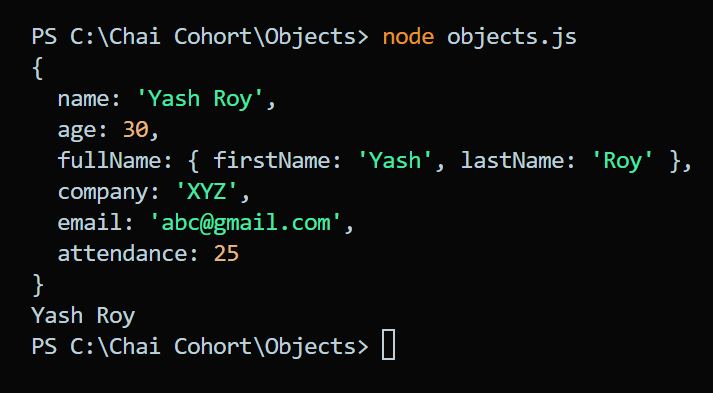
Accessing property
console.log(person.name); //Output : Yash Roy
consloe.log(person.company); //Output : XYZ
Accessing nested property
console.log(person.fullName.firstName); //Output : Yash
Calling Method
const person = {
    name : "Yash Roy",
    age : 30,
    fullName : {
        firstName : "Yash",
        lastName : "Roy"
    },
    company : "XYZ",
    email : "abc@gmail.com",
    attendance : 25,
    greet : function() {
        return `Hello, my name is ${this.name}.`;
    }
}

//Calling method
console.log(person.greet()); //Output : Hello, my name is Yash Roy.
Updating Property
person.age = 27;
console.log(person.age) //Output : 27
Adding New Property
person.phoneno = '123456789'
console.log(person); // Output : 123456789
Object.assign( ) method
The Object.assign( ) method copies properties from one or more source objects to a target object.
const person = {
    name : "Yash Roy",
    age : 30,
    fullName : {
        firstName : "Yash",
        lastName : "Roy"
    },
    company : "XYZ",
    email : "abc@gmail.com",
    attendance : 25,
    greet : function() {
        return `Hello, my name is ${this.name}.`;
    }
}
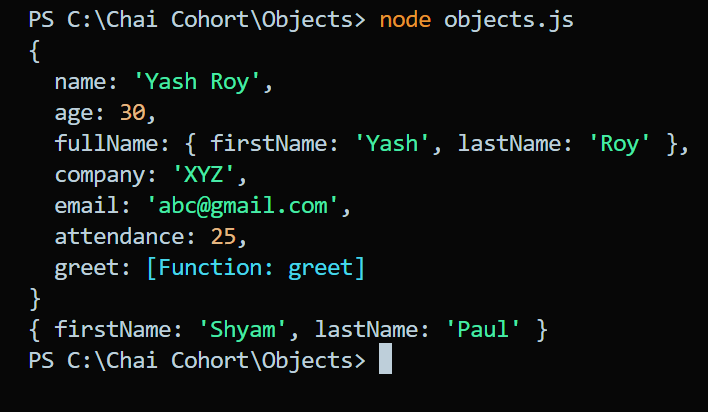
console.log(person);

const person2 = {firstName : "Shyam" ,lastName : "Paul"}
console.log(person2);
Output :
Object.keys( obj) method
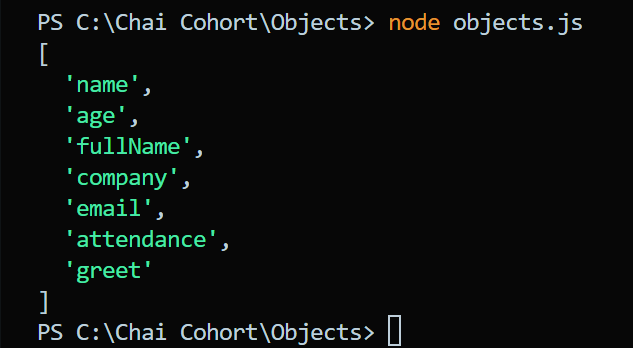
It returns all the keys of an object
console.log(Object.keys(person))
Output :
Object.values(obj) method
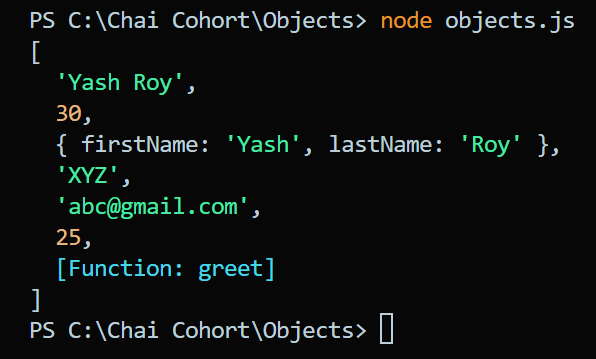
It returns the values of an object.
console.log(Object.values(person))
Output :
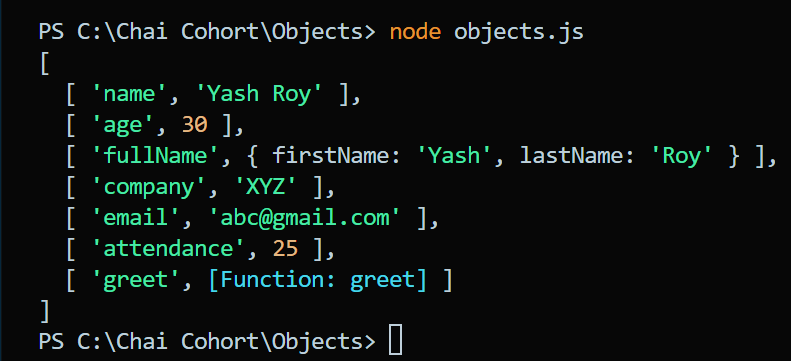
Object.entries(obj) method
It returns all the entries of an object .
console.log(Object.entries(person));
Output :
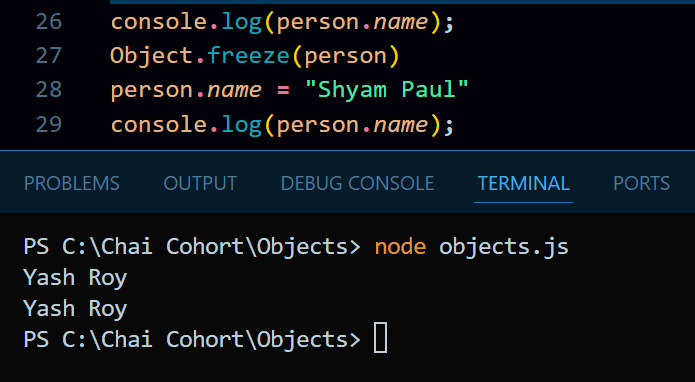
Object.freeze(obj) method
This method prevents all the changes of the object .
Object.freeze(person)
Output :
Object.hasOwnProperty(prop) method
console.log(person.hasOwnProperty("name")); // true
Object Destructuring
Object destructuring is a way to extract values from objects into variables.
let person = { name: "Shyam", age: 30 };
let { name, age } = person;
console.log(name); // Shyam
console.log(age); // 30
Merge two Object
Using Object.assign( ) method:
 let obj1 = { a: 1, b: 2 };
 let obj2 = { c: 3, d: 4 };
 let merged = Object.assign({}, obj1, obj2);
 console.log(merged); // { a: 1, b: 2, c: 3, d: 4 }
Here, {} is the target (an empty object), so it remains unchanged, and properties from obj1 and obj2 are copied into it.
Using Spread Operator(. . .)
 let merged = { ...obj1, ...obj2 };
 console.log(merged); // { a: 1, b: 2, c: 3, d: 4 }
Conclusion :
Objects are a fundamental part of JavaScript and are used to store and manipulate data. They come with various property types, methods, and descriptors that allow for flexible and powerful programming.